 Telemetry overlays for action creators
Load original GoPro files
LiveLayer reads available GPS and sensor streams from the source media before preview/export.
GoPro telemetry video editor
LiveLayer combines timeline editing with telemetry-aware overlays, so speed, GPS, altitude, route, pitch/roll, and activity-specific gauges stay tied to the footage you are cutting.
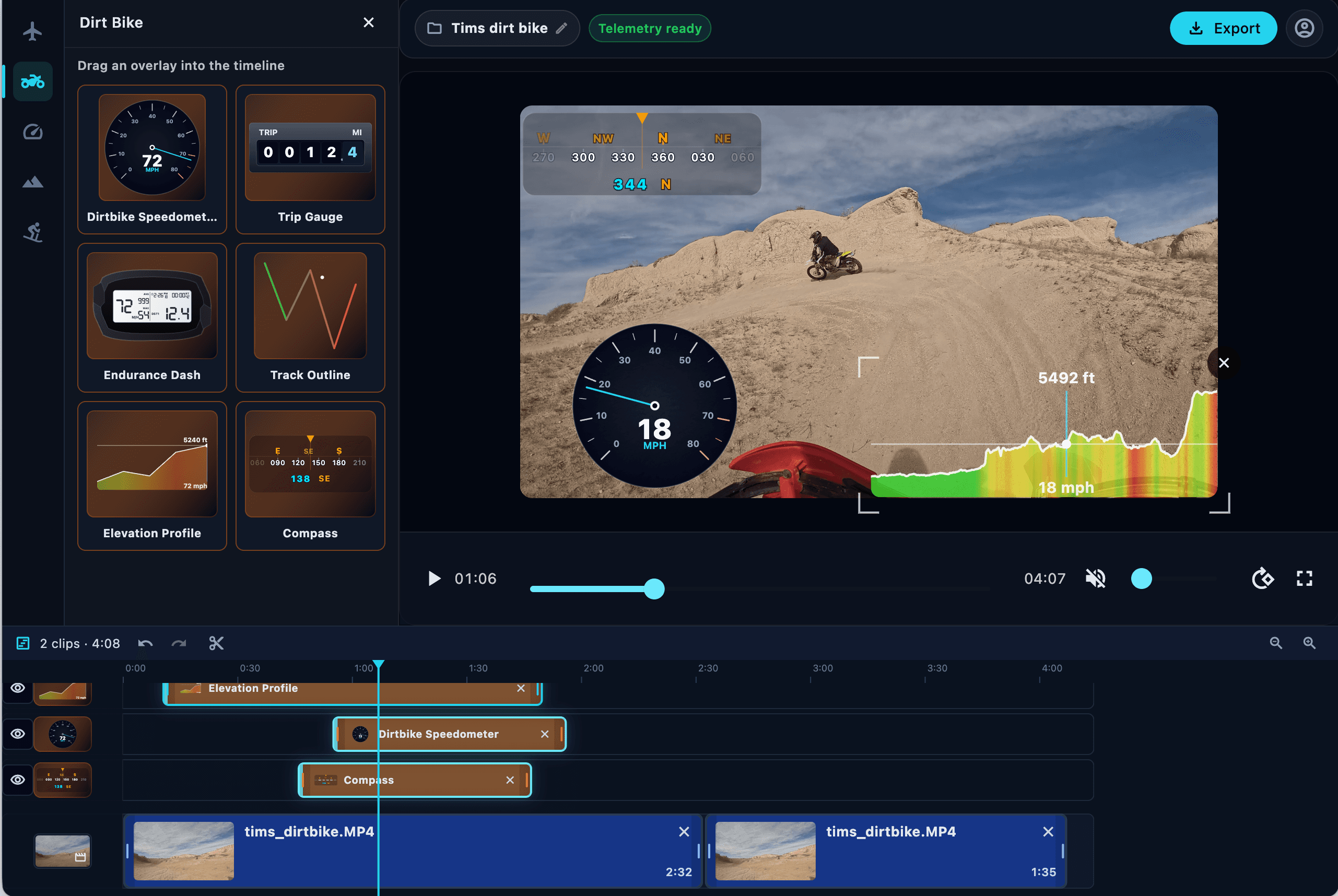
Traditional video editors treat telemetry as a separate graphics problem. LiveLayer treats it as part of the edit.
LiveLayer reads available GPS and sensor streams from the source media before preview/export.
Cut, trim, split, and arrange clips while the telemetry resolver maps each playhead position to the right source data.
Place overlays on their own timeline rows, adjust durations, and set whether data uses the overlay span or full recording.
Render a finished video with telemetry visuals burned in, including repaired telemetry mode when enabled.
Turn repetitive helmet-cam footage into clips with speed, distance, terrain, and motion context.
Use telemetry visuals to explain line choice, pace, attitude, slope, or obstacle handling.
Build a repeatable telemetry style for YouTube, short-form social clips, and polished trip edits.
Use LiveLayer when the story depends on speed, GPS, altitude, slope, route, or instrument data.